
Chat Co-pilot
Agent-to-agent assistance — Claude drafts each reply to a company's chatbot, you click Send.
When a company's website has an on-page chatbot widget (Intercom, Drift, Zendesk, HubSpot, Crisp, Tawk, Salesforce, plus a generic detector), the Chat Co-pilot turns it into a guided drafting experience: type your goal, Claude drafts the opening message, and the extension handles the loop — opening the chatbot, sending each message only when you click Send, watching for replies, and drafting the next response.
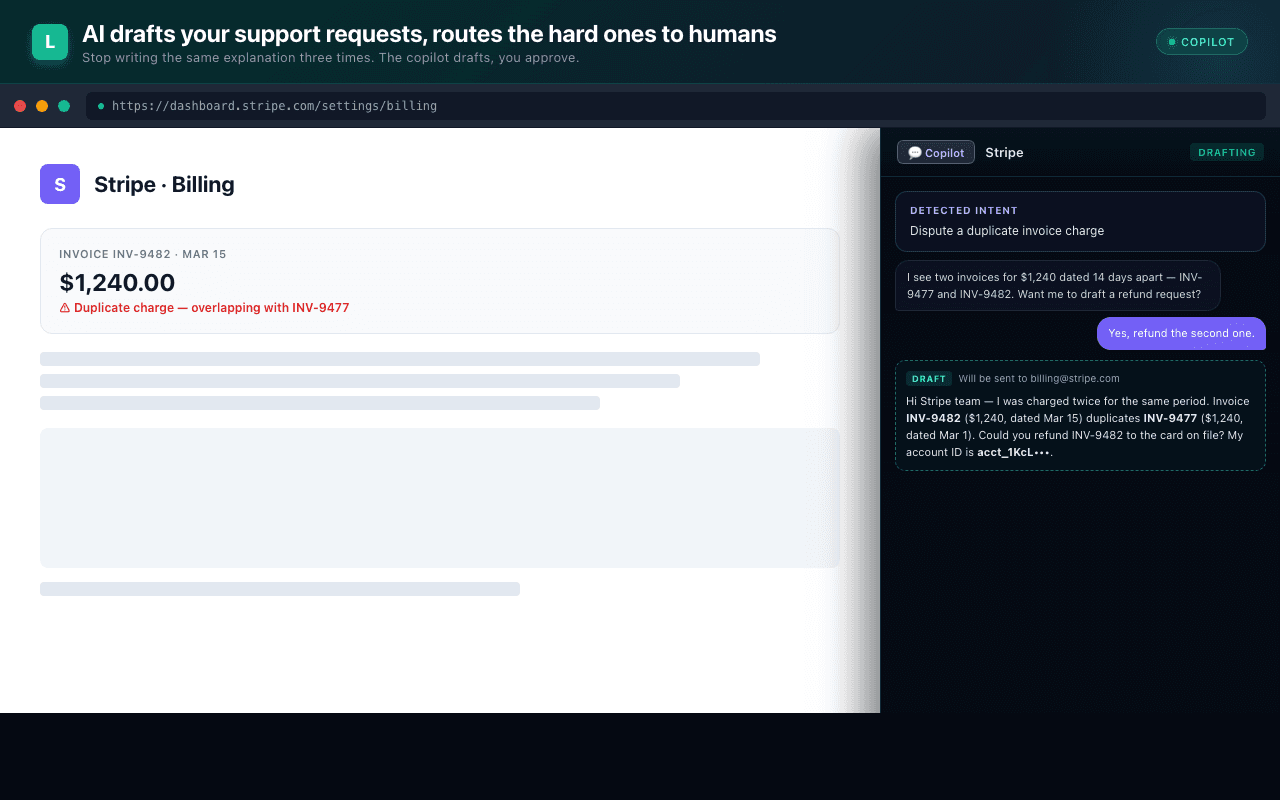
How it works
- You're on a company's site that has a chatbot. The panel detects the widget.
- You type your goal (e.g. "I want to dispute INV-9482 — looks like a duplicate of INV-9477").
- Claude drafts the opening message and shows it to you in the panel.
- You click Start co-pilot. The extension opens the chatbot widget and posts the opener.
- The chatbot replies. The extension's
MutationObserverreads the reply, passes it back to Claude, and a draft response renders in the panel. - You click Send for each draft, or type a free-form reply when the AI shouldn't speak for you.
- A persistent Stop button at the top of the panel detaches the observer in one click.
The on-page chatbot widget can be hidden with one click — the conversation renders inside the panel without visual competition.
The single-step rule
The Chat Co-pilot never sends two messages on one click. Each outbound message is its own user-confirmed action. There is no "auto-send" mode.
Binding-action safety
Every drafted reply is run through a binding-action classifier before Send is enabled. Categories:
| Category | Behavior |
|---|---|
safe | Send is enabled normally. |
cancellation | Requires explicit "I authorize this" toggle. |
payment_change | Same. |
contract_change | Same. |
escalation | Same. |
Parse failures default-deny. The classifier is a separate Claude call from the drafting call, so a hallucinated draft can't suppress its own gate.
Vendor adapters
Adapters live in extension/src/content.js
and cover Intercom, Drift, Zendesk Web Widget, HubSpot, Crisp, Tawk, and
Salesforce Embedded Service. A generic adapter handles any chat widget that
exposes a textarea + send button via standard DOM patterns.
Privacy
Chat Co-pilot transcripts stay in chrome.storage (device-local) by default.
Backend recording is opt-in for autonomous-mode rollout — see
Security & privacy.
Related
- Ask AI → — when there's no chatbot to drive.
- Security & privacy → — how transcripts are handled.