
Features
Ask AI
A chat assistant grounded in the current company, your profile, and the cached AI Overview.
Ask AI is the chat assistant inside the side panel. It's grounded in three things: the current company's cached AI Overview, the user's profile, and the specific question you ask.
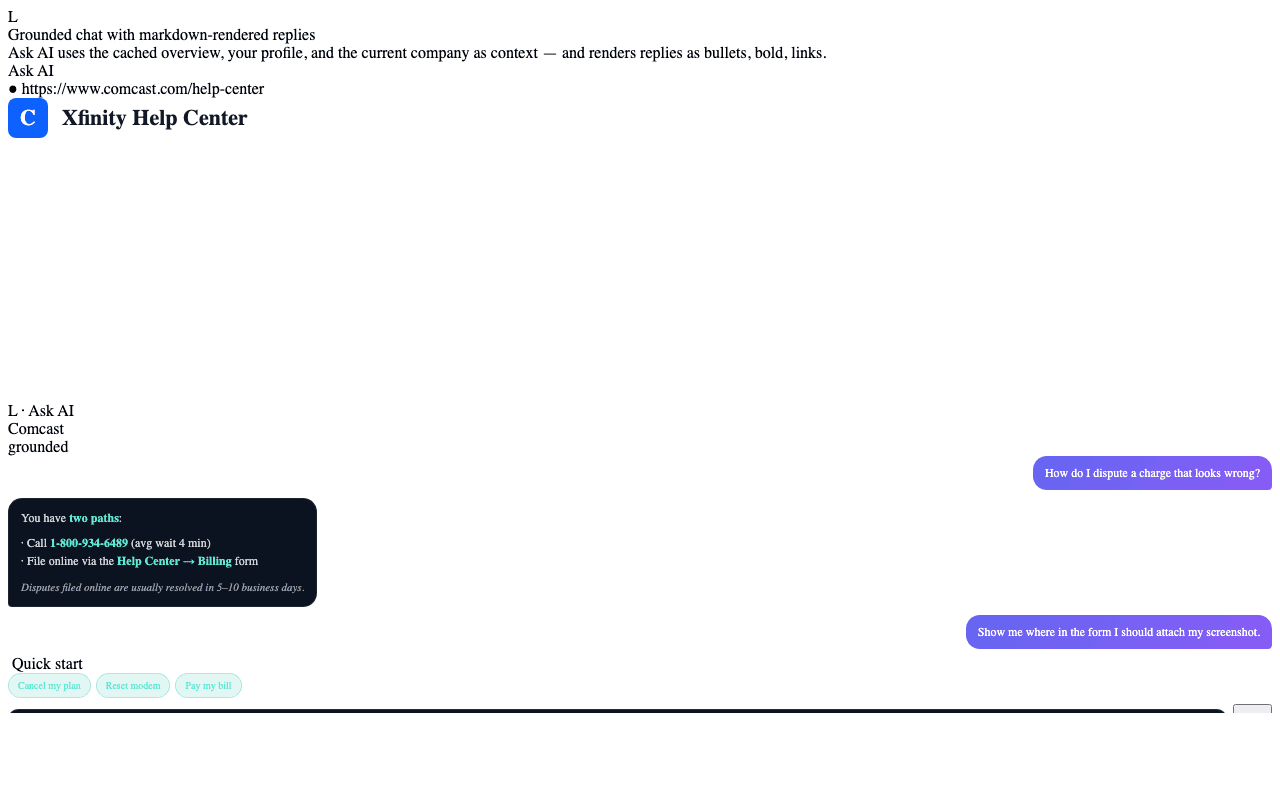
Two ways to start
- Type a question. A Perplexity-style auto-growing textarea lives at the bottom of the Ask AI view. Hit Enter to send.
- Tap a quick-start bubble. When you open Ask AI, Claude has pre-generated three to five context-appropriate prompts (e.g. "Track an order", "Dispute a charge", "Cancel my subscription"). One click sends the prompt and renders the response.
What grounds the response
Every Ask AI call sends Claude:
- The company name and AI Overview (description, HQ, top reasons).
- The user's profile (first name, age range, plan, signup reasons) — never sensitive identifiers.
- The conversation history within the current Ask AI session.
- The question itself.
The system prompt instructs Claude to:
- Stay on-topic for the company in context.
- Cite the source (the company's overview or a published policy) when making factual claims.
- Refuse questions that require browsing the web or calling external APIs — Ask AI is read-only against the cached context.
- Render responses as Markdown so the panel can format bullets, bold, and
links cleanly. Replies never contain raw
*asterisks*or**bold**syntax.
Privacy notes
- Ask AI does not see Plaid purchase data unless the user explicitly attaches a receipt or transaction to the prompt.
- Conversation history stays in
chrome.storage(device-local) by default. Backend recording is opt-in for autonomous-mode rollout. - The extension sends calls directly to Anthropic when running in BYO-key mode; in default mode they route through the Teleperson backend, which does not log prompts or responses (only metadata: token counts, latency, outcome).
When to reach for Voice Concierge instead
Ask AI is great for one-off questions that have textual answers. The Voice Concierge is the right tool for multi-turn conversations or any task that benefits from speaking and listening (driving, hands-free, hold queues). The Voice Concierge has access to your entire Hub, not just the current company.
Related
- AI Company Overview → — the grounding context.
- Voice Concierge → — the spoken-conversation alternative.