
Voice Concierge
Real-time voice conversations with an ElevenLabs or Vapi agent that knows your full company list, your linked banks, and your subscriptions — with an optional type-instead mode for Vapi.
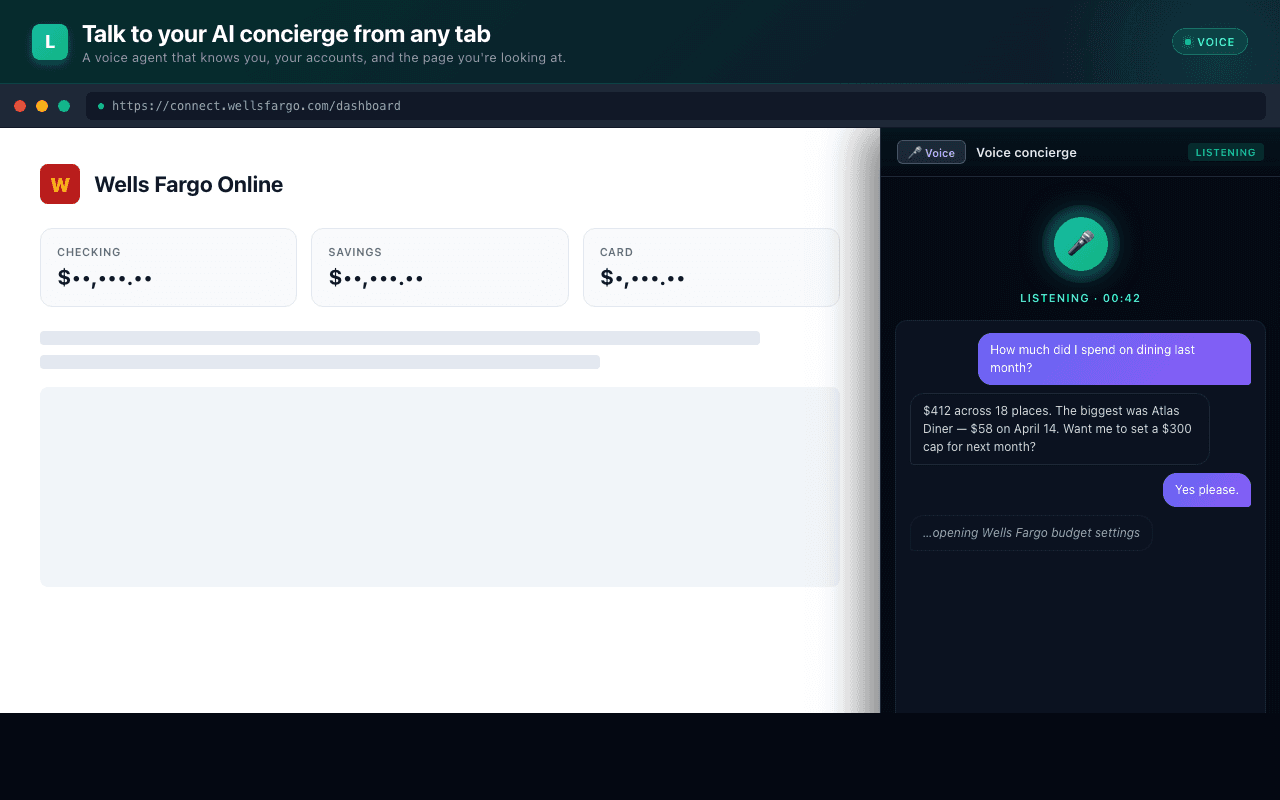
The Voice Concierge is a real-time WebRTC voice agent powered by ElevenLabs Conversational AI or Vapi. One click starts a hands-free conversation with an agent that has context across every company in your Hub — not just the one you're on right now.
Starting a call
The active voice provider is set in Admin → Voice AI. Once that provider's credentials are saved, a green Call button appears next to Ask AI in the side panel. One click:
- Requests microphone permission (one-time).
- Establishes a WebRTC session with the active provider (ElevenLabs or Vapi).
- Passes your context as dynamic variables: name, plan, current site, full followed-company list.
The agent greets you by name and is ready for whatever you ask.
The dock
Clicking Call opens a compact dock directly under the Ask AI / Call buttons — not a full-screen overlay. You can switch tabs (Overview, Subscriptions, Mail, Purchases, etc.) without ending the call, and the dock stays put at the top of the panel through every tab change. The voice session and transcript persist for the full duration of the call.
The dock has two render modes:
- Collapsed (default) — a single ~48px row with the speaking orb, status text ("Listening…", "Assistant speaking…", "muted"), a mute toggle, an expand chevron, and a hangup button. Quiet visual footprint so the rest of the panel stays usable.
- Expanded — adds a scrolling transcript with both sides of the
conversation rendered as bubbles, plus (Vapi only) a "type to your
concierge" input that runs through the
/chatREST endpoint with the same Assistant ID as the voice call. Voice and text turns interleave in the same transcript so you can switch modalities mid-thought.
The dock auto-expands when the first transcript line arrives so you get visible confirmation that the call connected; you can collapse it again with the chevron once you've confirmed.
The waveform indicator
The dock's left edge shows a compact horizontal waveform — five thin vertical bars that bounce out of phase to read as a moving wave. Each bar has a slightly different animation delay so the row never looks synchronized; on top of that base motion, the volume from the SDK amplifies every bar at once, so an actively-speaking assistant pushes them near full height while silence keeps them at a low idle bounce.
The volume value comes from the SDK's volume-level events at 10–30 Hz;
we pipe it straight into a CSS custom property on the wrapper element so
high-frequency audio events never trigger a React re-render. Footprint
is ~36 × 24 px — tucks under the header text without dominating the
dock.
The bars tint based on call state — emerald gradient during active conversation, zinc when ended, rose on error.
What you see during the call
- Live transcript — both sides of the conversation as bubbles, pinned to the bottom as new lines arrive.
- Mute — silences your microphone without ending the call. Visible in the dock header during active calls.
- Hang up — ends the session and dismisses the dock. Always visible in the dock header.
- Type to your concierge (Vapi only) — text input below the
transcript when expanded. The assistant's reply appears as a
transcript bubble. Conversational state is threaded through follow-ups
via Vapi
previousChatIdso the assistant remembers what you've already asked.
What the agent can do
The agent's system prompt is configured by an admin (see the ElevenLabs Voice AI admin section in the extension). By default it's optimized for support tasks:
- Find the right phone number for your problem at any company in your Hub.
- Walk you through a Verified Call Tree turn-by-turn.
- Summarize what you've spent recently with a specific company (when Plaid is connected).
- Hand off to Ask AI when a textual answer is more appropriate.
Variables the agent has on every call
Every call passes the user's full context to the assistant as dynamic
variables. Reference any of these from the system prompt as {{variableName}}:
| Variable | Description |
|---|---|
firstName, fullName, email, plan | Profile fields. firstName falls back to there so the greeting reads naturally for users without a name set. |
currentCompany, currentDomain | The company the side panel is currently scoped to. |
companyCount, companyList | Up to 50 names the user follows or has added locally. |
plaidLinked | yes or no — whether the user has any banks linked through Plaid. |
plaidInstitutions | Comma-separated list of institution names (up to 10). |
subscriptionCount | Total recurring subscriptions detected. |
monthlySubscriptionTotal | E.g. $87.94 — pro-rated for quarterly plans. Empty string when no subs detected. |
topSubscriptions | Up to 5 detected subscriptions with their last-charge price, comma-separated. |
priceUpCount, priceUpList | Count and names of subscriptions whose latest charge is materially higher than the prior month — useful for proactive callouts like "I noticed Spotify went up — would you like me to find their cancel link?". |
The agent never takes actions on your behalf — no calls, no payments, no plan changes. It speaks and listens; commitments are always your action.
Sandbox isolation
ElevenLabs ships a WebRTC SDK that needs unsafe-eval to run. We isolate it in
a sandboxed iframe (extension/src/sandbox/elevenlabs-sandbox.js) with a relaxed
CSP scoped to that single frame. The rest of the extension keeps a strict CSP.
The same pattern applies to the alternate Vapi voice provider, isolated in its own sandbox.
When this isn't available
The Call button only appears when the active provider in Admin → Voice AI is fully configured:
- ElevenLabs — needs an Agent ID (and an API key for private agents).
- Vapi — needs both a Public Key and an Assistant ID.
If credentials are partially set, the panel shows an amber hint that names exactly which field is missing — click it to jump straight to the admin screen. If credentials are complete but the Enable voice concierge toggle is off, the hint reads "Voice Call is disabled."
The active provider is auto-picked when only one is configured, so adding Vapi credentials lights up the Call button immediately even if you never clicked the Vapi chip in the admin. Switching back is a single click on either chip whenever you're ready.
Test connection
The Vapi card in Admin → Voice AI has a Test connection button that runs the same handshake a real call uses, in dry-run mode:
- Verifies the Vapi sandbox URL is reachable.
- Loads the page in a hidden iframe and waits for its
readypostMessage. - Hands the public key to the SDK to confirm initialization.
- If a private API key is set, hits Vapi's
/chatREST endpoint with a trivial input to confirm the key authenticates and the assistant ID resolves on Vapi's side.
Each step renders as a checklist with green / red status. On failure, the underlying error message is shown verbatim — paste it into a support thread or the "Help" tab if it isn't immediately actionable.
The test stops short of vapi.start() so it doesn't ask for microphone
permission. If the test passes but a real call doesn't make sound, the
problem is microphone permission at docs.teleperson.com (the sandbox
origin) — grant it from the URL-bar lock icon and try again.
Sandbox debug mode
Opening https://docs.teleperson.com/extension-vapi-sandbox?debug=1 in a
regular browser tab renders a small status panel showing whether the page
booted, whether the Vapi SDK loaded, and the last postMessage event seen.
Useful for verifying the deploy without needing devtools. The same overlay
shows automatically when the page is loaded outside an iframe.
Related
- Ask AI → — the textual alternative.
- Verified Call Trees → — what the Concierge walks you through.