
Admin & operators
ElevenLabs Voice AI configuration
Wire up the ElevenLabs Conversational AI agent that powers the Voice Concierge.
The Voice Concierge is powered by an ElevenLabs Conversational AI agent that you configure once on the ElevenLabs side and wire into Teleperson with two values.
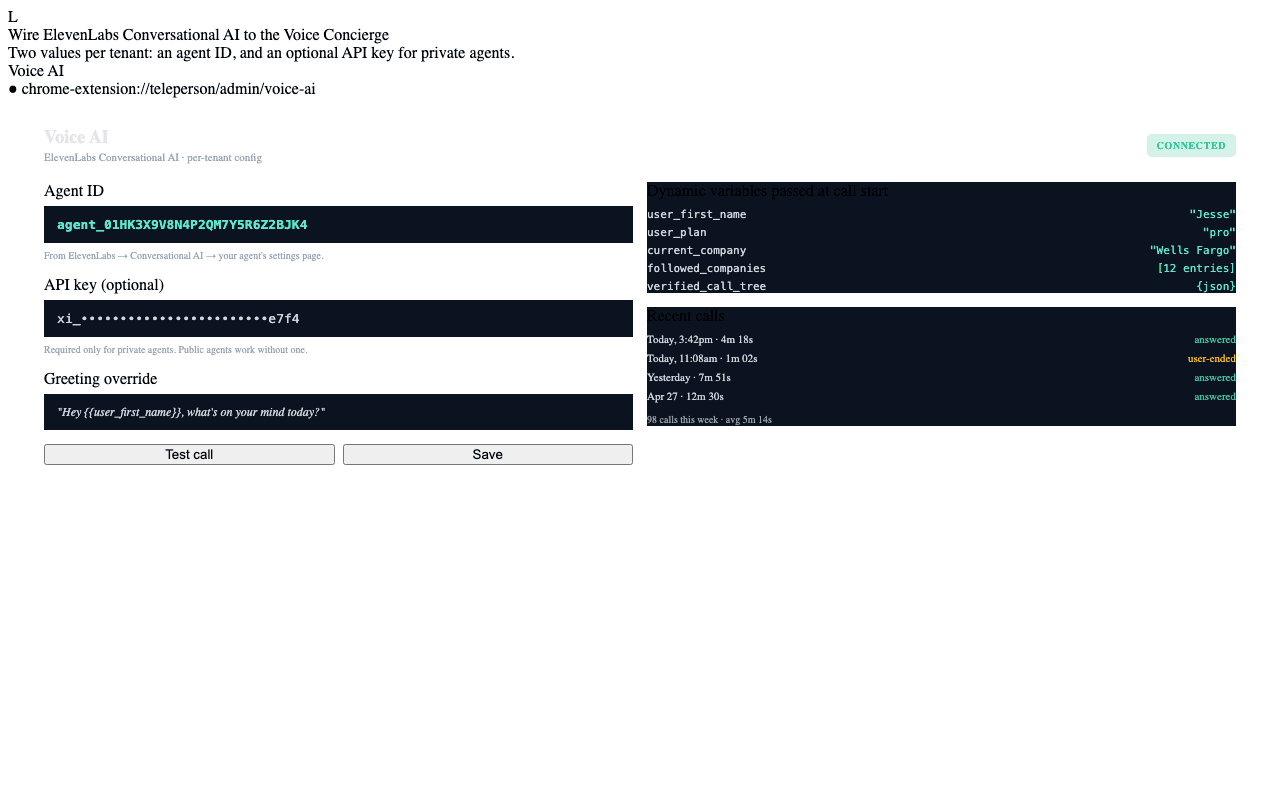
What you configure
In the Voice AI tab of the Admin Dashboard:
| Field | Required | Purpose |
|---|---|---|
| Agent ID | Yes | The ElevenLabs Conversational Agent's ID (agent_…). |
| API key | Optional | An ElevenLabs API key. Required only if your agent is private; public agents work without one. |
| Greeting override | Optional | Override the agent's default greeting on a per-tenant basis. |
How to create an ElevenLabs agent
- Sign into the ElevenLabs dashboard and navigate to Conversational AI.
- Create a new agent. Pick a voice that fits your tenant's brand.
- Configure the system prompt (we ship a recommended starter prompt — see below).
- Set up dynamic variables:
user_first_name,user_plan,current_company,followed_companies(comma-separated). - Copy the agent ID and paste it into the Voice AI tab.
Recommended system prompt
Teleperson ships a tested starter prompt for the Voice Concierge. The full text lives internally — copy it from your Teleperson onboarding kit or contact us for the latest version. Key behaviors the prompt enforces:
- The agent never takes binding actions (cancellations, payments, contract changes). It speaks and listens; commitments belong to the user.
- The agent grounds answers in the dynamic variables passed at call start, not the open web.
- The agent hands off to Ask AI when a textual answer is more appropriate.
- The agent reads Verified Call Trees step-by-step when you're navigating an IVR.
Per-call dynamic variables
The extension passes these to ElevenLabs at the start of every call:
{
  "user_first_name":     "Jesse",
  "user_plan":           "pro",
  "current_company":     "Wells Fargo",
  "current_url":         "https://connect.wellsfargo.com/dashboard",
  "followed_companies":  "Comcast, Wells Fargo, Spotify, Apple, Verizon, SoulCycle",
  "verified_call_tree":  "<JSON of current company's tree, when known>"
}
The agent reads these as variables in its prompt and grounds replies accordingly.
What never gets passed
- The user's email address or full Supabase user ID.
- Plaid transaction data (unless the user explicitly mentions it mid-conversation, in which case the agent answers from short-term memory only — no tool call back to Teleperson's backend).
- Card data, Stripe details, or anything PCI-scoped.
Related
- Voice Concierge → — the user-facing feature.
- Voice provider sandbox iframes → — how ElevenLabs runs without compromising the extension's CSP.