
Authentication & X-TLE-Token
How the extension proves who it's talking to without holding a long-lived bank credential equivalent.
Teleperson runs two parallel auth models. The web admin app and signup
flow use Supabase Auth (JWT). The browser extension uses a separate
long-lived extension token model — X-TLE-Token — designed to survive
across browser restarts without keeping the user signed into Supabase from
within the extension.
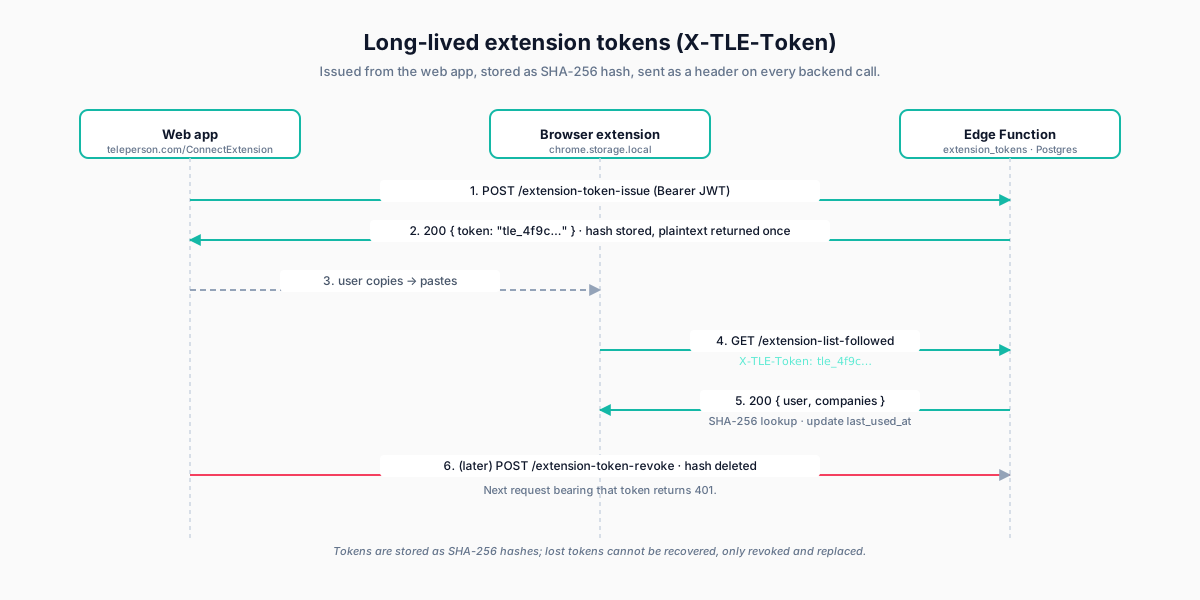
The token shape
Extension tokens look like:
tle_4f9c2e8a1d7b6c5f3a2e1b0c9d8e7f6aA tle_ prefix followed by 32 hex chars from crypto.randomBytes(16).
The string is the only copy the user sees — Postgres stores its
SHA-256 hash. We can verify a token but never recover it.
How tokens are issued
A user issues their own token from
/ConnectExtension
on the web app:
- The user is signed into the web app via Supabase Auth (a browser session, JWT in cookies).
- They click Issue new extension token. The web app calls
extension-token-issuewith the JWT. - The Edge Function generates a token, stores its hash in
extension_tokens(withuser_id,created_at,last_used_at, optionalname), and returns the plaintext token once. - The user copies it, pastes it into the extension's Backend admin tab.
After that initial paste, the extension stores the plaintext token in
chrome.storage.local and uses it for every subsequent backend call.
How requests are authenticated
Every Edge Function that the extension calls follows the same pattern:
import { authExtensionRequest } from '../_shared/extensionAuth.ts';

export default async (req: Request) => {
  const { user, token } = await authExtensionRequest(req);
  if (!user) return new Response('Unauthorized', { status: 401 });
  // … function body, with `user` resolved from the token …
};
Internally, authExtensionRequest:
- Reads
X-TLE-Tokenfrom the request headers. - Hashes it (SHA-256).
- Queries
extension_tokensfor a matchingtoken_hash. - Updates
last_used_at(best-effort, fire-and-forget). - Returns the resolved
user_idand the user's profile row.
Row-level security on user-scoped tables uses auth.uid() for JWT calls
and a SET LOCAL session variable for X-TLE-Token calls — same RLS policies,
two access paths.
Token revocation
A user can revoke any of their issued tokens from
/ConnectExtension. Revocation is a DELETE on the
extension_tokens row. The next request bearing that token gets a 401 and
the extension surfaces a "your token was revoked" prompt.
Why not just JWTs?
Supabase JWTs expire on a short cycle (1 hour by default) and refresh requires interaction. Inside the extension's service worker, refresh flows are awkward — there's no good place to put a "your session expired, sign in again" prompt that doesn't disrupt every interaction. Long-lived opaque tokens with revocation give the same security properties without the UX friction.
What never gets sent
- Plaintext passwords. The web sign-in flow uses Supabase Auth which hashes server-side; the extension never touches a password.
- Plaid access tokens. Those live encrypted at rest in Postgres and never leave Edge Functions in plaintext.
Related
- Edge Functions & encryption → — how the backend protects what the extension can't see.
- Backend tokens admin → — issuing and revoking.